Please Scroll Down to See Forums Below

napsgear
genezapharmateuticals
domestic-supply
puritysourcelabs
UGL OZ
UGFREAK
napsgeargenezapharmateuticals domestic-supplypuritysourcelabsUGL OZUGFREAK

Odd Computer Issue. Comp Savvy folk take a gander

have recieved several times a message in the upper left corner of my Internet Explorer.... "Hack and Spy by such and such" and i dont know what the hell to make of it, im concerned this machine has been comprimised by a trojan or spyware....anyone know anything about this thing?
 
Have you already downloaded a trojan killer?
Do you watch your registry?
Did you look what programs are running in the background of the system?
 
I ran PestPatrol as well as Adaware and they came up real lean on things, mainly cookies and a single registry entry called Alexa, got rid of all of them, I ran Nortons 03 with the latest updates and it came up negative for anything.

i dont watch my registry, what should i look for?

i did but i didnt see anything running out of the ordinary.
 
Is it a dialog box or in the actual title header where it usually says the name of the site?

Besides running adaware which you've already done, do a windows update, make sure file sharing is off, maybe go get scanned at grc.com. Shit like that.
 
Some people run programs that watch the registry, so they know when some unwanted program installs itself.
There should be some people here that know more about it than i do.

Until then , the cleaner was recommended to me once, it can be downloaded for free from www.moosoft.com .
 
demo.gif


it was within the box, it looked like Text right ontop of IE which stated "Hack and Spy by Optix" or something to that effect....oddest thing i have ever seen
 
nope it was simple transparent text on top of IE which stated Hack and spy by optix or something like that. I can make a graphical representation if you would like a better picture,
 
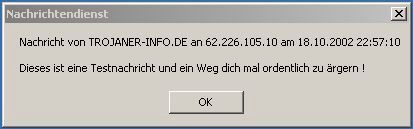
There is a way to send advertisement-messages to a wide range of ip - adresses. If you don´t find a trojan it might be that.
I know an instruction on how to disable that, but it is in German :bawling:
do you have windows xp or 98?
 
Ok, i don´t know the correct English terms for the different buttons, but we can give it a try, i guess they have the same icons as they have in German.
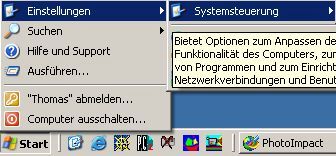
first press start
xp_1.jpg


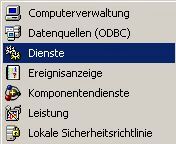
xp_2.jpg


xp_3.jpg


until you reach:

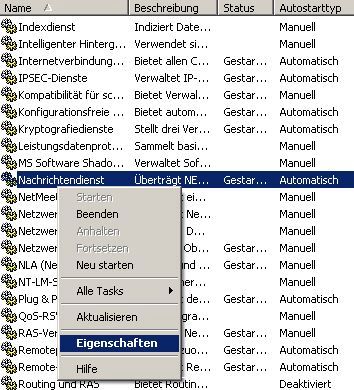
xp_4.jpg


here you have to find something called windows messenger or messenger. Here you click on attributes (or whatever it is called).
In the box where you will get you should be able to disable the thing.
 
so far i have run the following
Pestpatrol
Nortons Antivirus 2003
Pcflack.com online trojan check
SpyBot seek and destroy
The Cleaner
Ad-Aware

all have come up negative for anything
 
Top Bottom